Code You Can Use NOW!!
─── ⋆⋅☆⋅⋆ ───
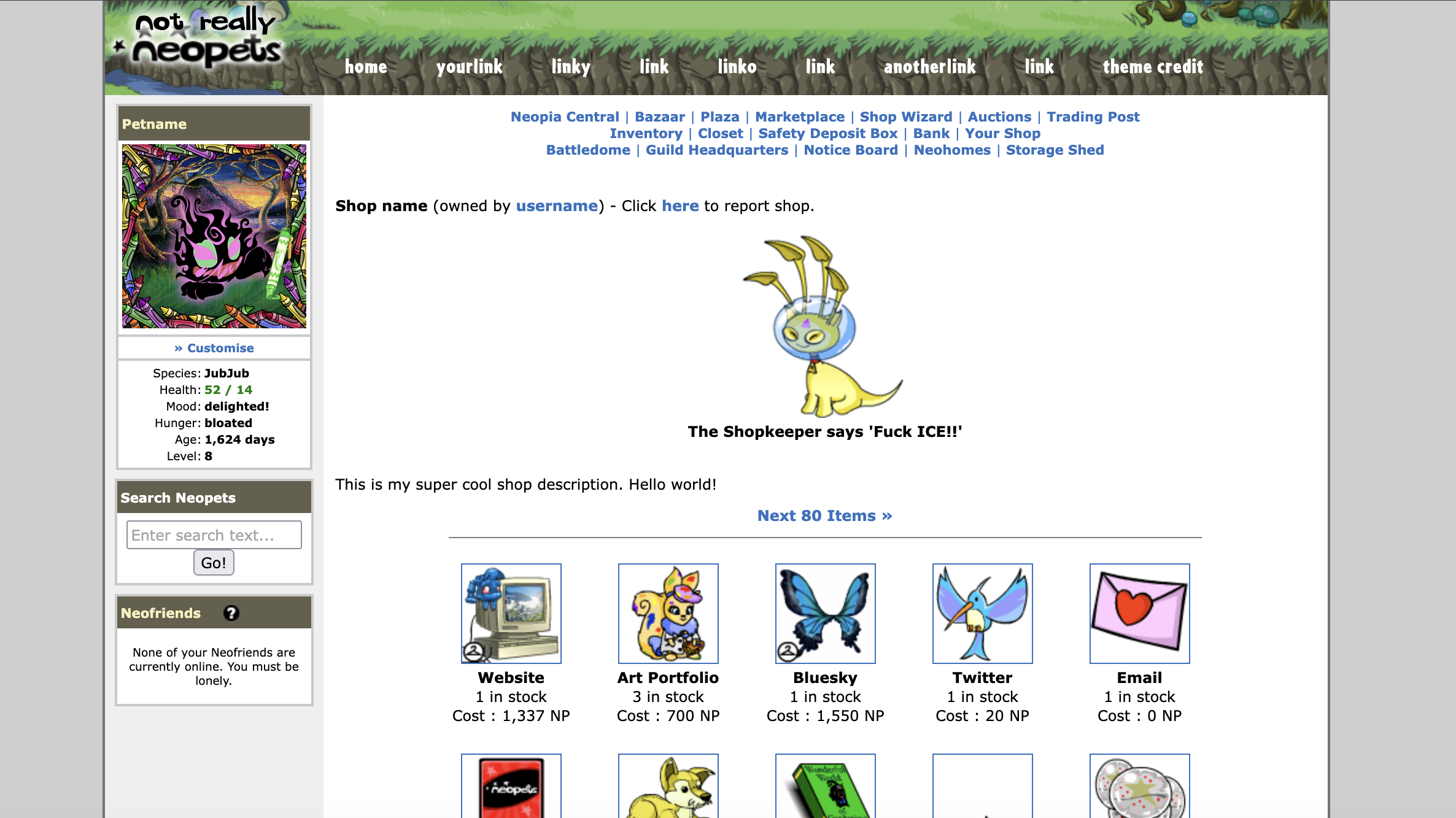
HTML, CSS, and optional JS to have your own Neopets shop page, like mine.
Use it on your shop page, about page, or your entire website! Go wild!
It's fully customizable.
Disclaimer stuff
This project is 100% free to copy, paste, and modify, just don't delete the code credit to me and, more importantly, don't delete the Neopets copyright notice. They can actually afford lawyers.
You may not sell or profit off the original code or any derivatives you make.
Don't modify a NeoShop page for any illegal or evil purposes.
If you like my work, consider sending thanks on Ko-fi.
Please remember to DOWNLOAD any Assets (font files, images, etc.) and upload them to YOUR OWN site!
The HTML comes with images hosted on Neopets.com and fansites, but please update these links with your own hosted images asap.
Installation instructions:
0. Assets - save and upload to your site any images you want to use. You'll need a Shopkeeper, header, footer, active pet, and Items. Fansite databases for all such images linked below. You could hotlink image files from Neopets.com but this is not recommended.
1. Style - copy and paste into a totally new CSS file. I recommend you name it /shopstyle.css or /neoshop/style.css
2. HTML - copy and paste into a totally new HTML file on your site.
3. Script (OPTIONAL) - To randomize the Shopkeeper greeting. Copy and paste the script into a new .js file on your site. I like to call this file /shopkeeper.js but you can call it whatever you want.
Yay! Your NeoShop page should look awesome and (optionally) display a different shopkeeper greeting upon refresh.
PLEASE VISIT THIS PAGE if you are struggling with the .js file!
Jump to a section:
The Main Stuff (HTML/CSS) • Assets • Optional Javascript
─── ⋆⋅☆⋅⋆ ───
Get the HTML and CSS
Files hosted on my Free Stuff GitHub repository.
I would normally host them right here in a little scrollbox but they're way too big lol.
Direct links to each GitHub file:
Assets - Image and Font Files
The image type names below will take you to reputable Neopets fansites that host thousands of images of that category. I've linked each word directly to the relevant results - i.e. Header will show you only header images to choose from.
| Images | Fonts |
|---|---|
|
1. Header
2. Active Pet: use your own or explore the images here. 3. Shopkeeper 4. Items 5. Footer |
• Heffaklump.ttf - for the "not really" above the Neopets logo
• Cafeteria.ttf - the navigation bar |
To install the fonts, upload these .ttf files somewhere on your static site.
I like to use a folder named /fonts.
Then, make sure the links in this part of the CSS points correctly to where your font file is located:
@font-face {

font-family: "Heffaklump"; /* neopets logo font */

src: url("https://YOURWEBSITE.com/fonts/heffaklump.ttf") format("truetype");

}

@font-face {

font-family: "Cafeteria"; /* navigation links font */

src: url("https://YOURWEBSITE.com/fonts/cafeteria.ttf") format("truetype");

}
(Optional) Script to Randomize the Shopkeeper Greeting
PLEASE VISIT THIS PAGE if you are struggling to add/remove/customize the greetings.
I recommend you name this file /shopkeeper.js
Backup version on my GitHub here.
| Script |
|---|
─── ⋆⋅☆⋅⋆ ───
NeoShop layout cobbled together and distributed for free by LARVAMOLT.
NEOPETS and all related indicia are trademarks of Neopets, Inc., © 1999-. ® denotes Reg. USPTO. All rights reserved.
Something something fair use. :)